Divisions & Entry Ranges
Divisions and entry ranges are the building blocks of how payouts and points are calculated in SpeedySteeds. They are configured within an organization’s payout and point settings, and they work together to determine who gets paid (or earns points) and how much.
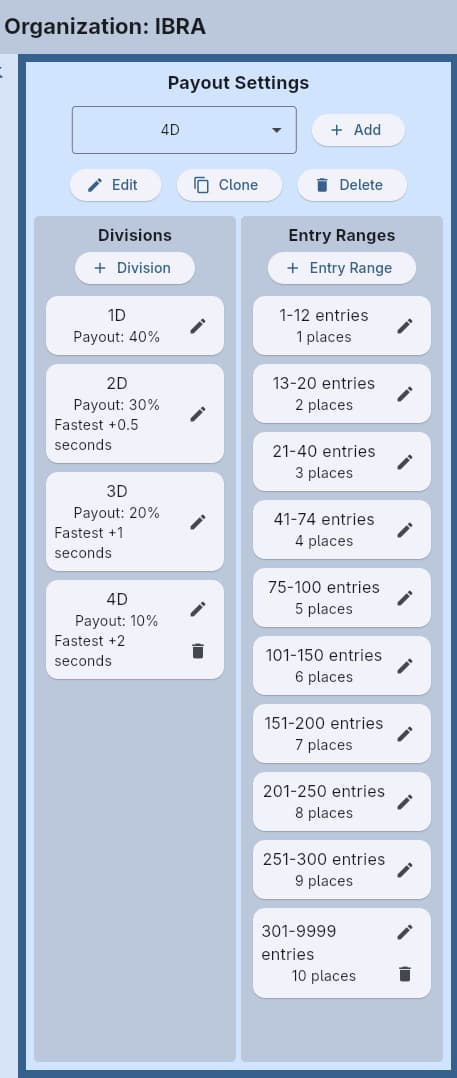
Divisions
A division groups riders by their time relative to the fastest qualifying run. Each division is defined by:
- Number - The division identifier (1D, 2D, 3D, 4D, etc.)
- Increment - The number of seconds added to the fastest time to define the upper boundary of this division
- Payout Percentage - What percentage of the division’s available prize pool goes to this division (used in payout settings only)
How Divisions Work
Divisions are calculated from the fastest time in the event. For example, with a typical 4D setup:
| Division | Increment | Time Range (if fastest = 15.000) |
|---|---|---|
| 1D | 0.000 | 15.000 – 15.499 |
| 2D | 0.500 | 15.500 – 15.999 |
| 3D | 1.000 | 16.000 – 16.999 |
| 4D | 2.000 | 17.000 and slower |
The first division always starts at the fastest time (increment of 0). Each subsequent division starts where the previous one ends.
When the organization’s Point Split Start is set to “Member,” divisions are calculated from the fastest member’s time rather than the fastest overall time. Non-member times are ignored for division boundaries.
Entry Ranges
An entry range defines how many places are paid (or earn points) based on the number of entries in an event. Each entry range has:
- Start - The minimum number of entries for this range to apply
- End - The maximum number of entries for this range
- Number of Places - How many places receive payouts or points within this range
- Values - The specific payout percentage or point amount for each place
- Threshold Type - What the start/end numbers represent:
- Entry Count - Based on the number of riders entered (most common)
- Purse Amount - Based on the total purse in dollars (used in WPRA and IPRA-style events)
- Added Money - Based on the event’s added money in dollars (used in BBR-style events where bonus points scale with added money tiers)
How Entry Ranges Work
The system checks how many entries are in the event (or what the purse total is) and selects the matching entry range. That range then determines how many places are paid and what each place receives.
For example, with these entry ranges:
| Range | Places | 1st | 2nd | 3rd | 4th |
|---|---|---|---|---|---|
| 1–5 entries | 1 | 100% | - | - | - |
| 6–10 entries | 2 | 60% | 40% | - | - |
| 11–20 entries | 3 | 50% | 30% | 20% | - |
| 21+ entries | 4 | 40% | 30% | 20% | 10% |
If 15 riders enter, the 11–20 range applies: three places are paid at 50%, 30%, and 20% of the division’s prize pool.
Payout percentages within an entry range should total 100%. These percentages represent the distribution within a single division’s prize pool - not the total event purse.
Divisions + Entry Ranges Together
Here’s how the full calculation flows:
- Collect entry fees - Total entry fees + added money = prize pool
- Apply payout percentage - The event format’s payout percentage determines how much of the prize pool is paid out
- Split by division - Each division’s payout percentage determines its share of the payout pool
- Apply entry range - Based on the number of entries in each division, the matching entry range determines how many places are paid and at what percentages
Example
- 20 entries, $30 entry fee each = $600 in entry fees
- 70% payout = $420 prize pool
- 1D gets 40% = $168, 2D gets 30% = $126, 3D gets 20% = $84, 4D gets 10% = $42
- If 1D has 5 entries and the 1–5 entry range pays 2 places at 60%/40%: 1st gets $100.80, 2nd gets $67.20
Point Values
For point settings, the structure is identical but values represent points per place rather than percentages. For example:
| Range | Places | 1st | 2nd | 3rd |
|---|---|---|---|---|
| 1–5 entries | 2 | 10 | 8 | - |
| 6–10 entries | 3 | 10 | 8 | 6 |
| 11+ entries | 4 | 10 | 8 | 6 |
Workflow
- Open the Organization settings
- Under Payout Settings or Point Settings, click to add or edit a configuration
- Add divisions with their increments and (for payouts) payout percentages
- Add entry ranges with their place counts and values
- Link the organization setting to an event format
See Also
- Organization - Where divisions and entry ranges are configured
- Event Format - Linking organization settings to events
- Results & Scoring - Seeing divisions in action during result entry
- Points & Standings - How points accumulate across a season