Points & Standings
Points accumulate across all shows within a season, giving you end-of-season rankings for each organization. SpeedySteeds calculates standings automatically based on the organization’s point settings and each rider’s results.
Standings Types
How riders are ranked depends on the organization’s Standings Type setting:
Points-Based Standings
The most common model for clubs like IBRA and NBHA. Riders earn points at each show based on their placement within their division. Points from all shows in the season are summed for the final standings.
Money Won Standings
Used by organizations like WPRA and IPRA. Riders are ranked by total prize money earned across all shows in the season rather than by a point system.
How Points Are Calculated
For each event at each show:
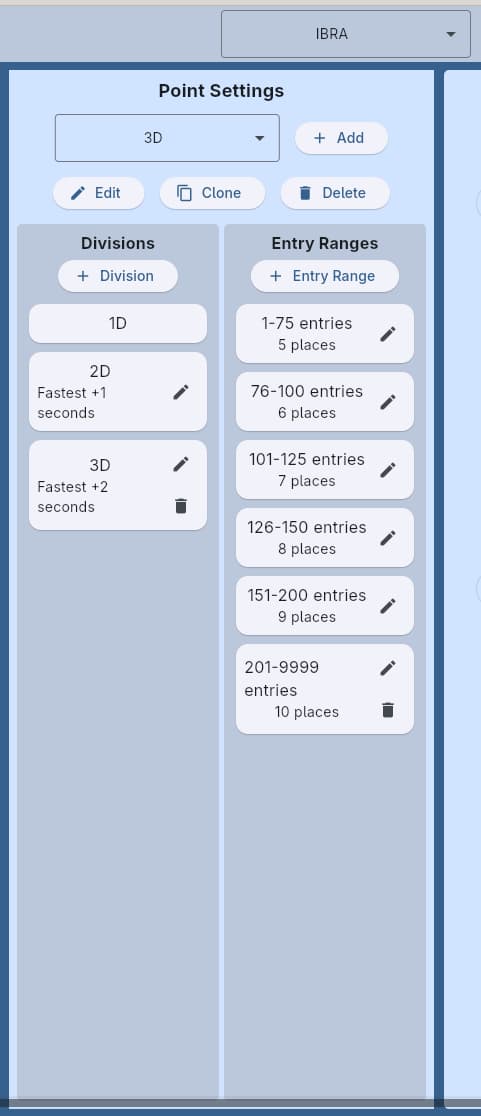
- Times are sorted and riders are placed into divisions based on the organization’s point settings
- The number of entries determines which entry range applies
- Each placing rider within a division receives the point value defined for that place in the entry range
Factors That Affect Points
- Membership required - Only riders with a membership in the organization earn points. Non-members can compete and place but accumulate no points.
- Points with penalty - If disabled on the organization, penalized runs receive zero points regardless of their placement
- Award Points To - Controls whether points track against the rider, the specific rider-horse combination, or the horse only (see Organization)
- Point split start - When set to “Member,” division boundaries are calculated from the fastest member’s time. When set to “Entry,” they’re calculated from the fastest overall time.
- Tie points - Tied riders either all receive the highest point value or split the combined points equally
- Minimum place - Riders placing below this threshold receive zero points
Viewing Standings
- Navigate to the Seasons tab and select a season
- Open the Point Standings dialog
- Select the organization whose standings you want to view
- Standings display all riders ranked by total points (or money won) for the season
The standings dialog shows:
- Rider name (and horse, if the organization tracks rider/horse combinations), or horse name with rider in parentheses for horse-only organizations
- Total points or money won
- Breakdown by show
Exporting Standings
You can export season standings to PDF or Excel from the point standings dialog. See Printing & Exporting for details.
Standings update in real-time as you enter results. You can check standings at any point during the season, not just at the end.
See Also
- Organization - Configuring point settings, split start, tie rules
- Divisions & Entry Ranges - How point values are assigned per place
- Memberships - Point eligibility through membership
- Circuit Standings - District-level standings within organizations
- Season - The boundary for standings accumulation
- Printing & Exporting - Exporting standings sheets