Rider Registration
Before a show begins, riders need to be registered for the events they want to compete in. SpeedySteeds supports both manual registration on show day and online pre-registration.
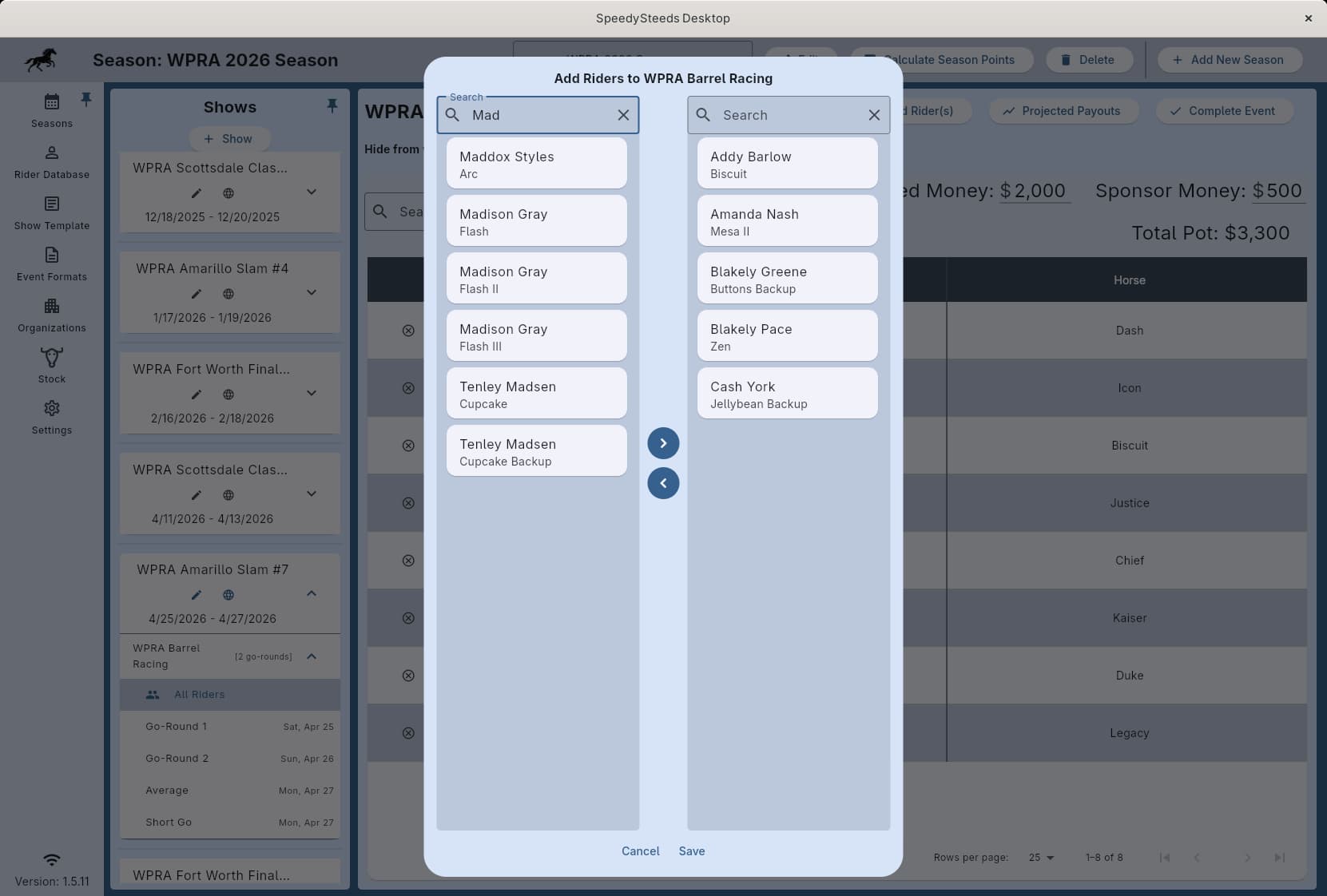
Adding Riders to Events
- Navigate to the Seasons tab, select your season, then select the show
- Select an event within the show
- Click the add rider button to open the registration dialog
The registration dialog presents two panels:
- Left panel - All available riders from your rider database
- Right panel - Riders currently registered for this event
Selecting a Rider and Horse
When adding a rider, you also select which horse they will ride. If a rider has multiple horses, each rider-horse combination is treated as a separate entry. A rider can enter the same event on multiple horses.
When a rider enters on multiple horses, the draw weight on each horse determines which horse runs first. The horse with the highest draw weight gets the earlier position in the draw.
Age Eligibility
The registration dialog respects the age requirements configured in the event format. Riders whose age doesn’t match the event’s age range will be flagged or prevented from registering, depending on the event configuration.
Online Pre-Registration
When pre-registration is enabled for a show:
- Riders register through the website
- In SpeedySteeds, go to Advanced Settings and use Fetch All Registrations (or let auto-sync handle it)
- Pre-registered riders appear in the rider database and are linked to their events
- Riders matched by email address are connected to existing database entries
Pre-registration closes automatically 24 hours before the show, or at the custom deadline you set when creating the show.
Viewing Rider Participation
You can view a rider’s event participation history across seasons and shows from the rider database. This is helpful for checking whether a rider has already entered specific events or for reviewing their competition history.
Workflow Summary
- Create your show and add events
- Enable pre-registration if desired
- On show day, open each event and add walk-up riders
- After registration closes, generate the draw
See Also
- Rider Database - Managing the riders available for registration
- Show - Pre-registration settings
- Draw Management - Generating run order after registration
- Show Fees & Billing - Collecting entry fees from registered riders