Advanced Settings
The Settings tab contains application-wide configuration options that affect behavior across all seasons and shows.
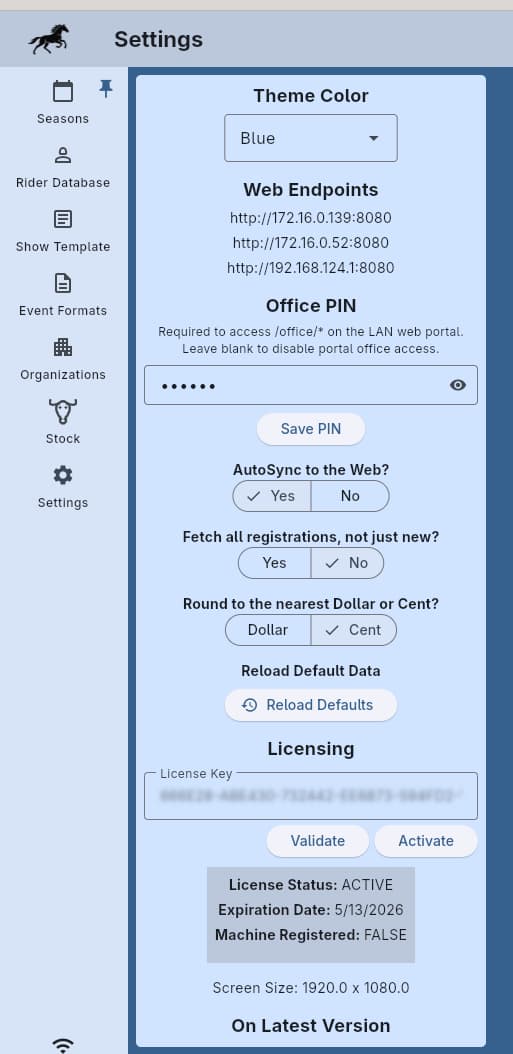
Theme
Select a base theme color for the application interface. The color picker lets you choose from a variety of accent colors to personalize the look of SpeedySteeds.
AutoSync to the Web
When enabled, show data and results are automatically synchronized to the SpeedySteeds website:
- Adding or changing a show automatically posts updates to the website
- Adding results to a show automatically syncs them for live viewing online
This eliminates the need to manually publish results after each event. Each successful AutoSync updates the corresponding last-published timestamp on the show, draw, or results so producers can see at a glance what has been posted.
Events flagged Hide from web on the show’s event list are skipped by both AutoSync and the manual publish actions. If an event had been published before the flag was enabled, switching it on also removes the event from the web - the local data stays intact.
AutoSync requires an active internet connection and a valid subscription. Data is synced in the background and does not interrupt your workflow.
Manual Publish Actions
When AutoSync is off, or when you want to force a fresh push, use the web actions menu (globe icon) next to each show on the seasons page:
- Publish All - Pushes the show metadata, show bill, every event draw, and every event’s results in one action
- Publish Show - Pushes only the show metadata and show bill
- Publish Draws - Pushes the draw for every event that is not hidden from web
- Publish Results - Pushes results for every event that is not hidden from web
Events with Hide from web enabled are skipped by every publish action. The last-published timestamps captured for a manual publish behave the same as an AutoSync push.
Fetch All Registrations
By default, when you fetch pre-registrations from the web, entries are marked as retrieved. The next time you fetch, only new (un-retrieved) entries are downloaded.
The Fetch All Registrations option overrides this behavior and re-downloads all pre-registration entries, including ones that were previously retrieved. This is useful if you need to re-sync all registrations or suspect some were missed.
Money Rounding
Configure how payouts are rounded:
- Round to nearest dollar - Payouts are rounded to whole dollar amounts
- Round to nearest cent - Payouts keep two decimal places
In both cases, SpeedySteeds uses banker’s rounding (round half to even) to minimize cumulative rounding errors across many payouts.
Reload Default Data
Restores any missing default organizations, org settings, event templates, and event-org mappings that ship with SpeedySteeds. This is useful if you accidentally deleted a built-in organization or if new defaults were added in an update.
- Existing data is never overwritten - only missing defaults are re-added
- If you renamed a default organization, the original will be re-added as a separate entry
- Custom organizations and settings you created are not affected
Web Server Info
Displays the connection URLs for the local web portal:
- The hostname-based URL (
http://speedysteeds.local:8080) - The IP address-based URL
Share these with anyone who needs to access the web portal on the local network.
See Also
- Local Web Portal - Using the web interface
- Licensing - License management in settings
- Show - Pre-registration settings that work with auto-sync