CSV Import
SpeedySteeds supports bulk importing riders and horses from a CSV file. This is useful for migrating from another system or pre-loading a large rider list.
CSV Format
The CSV file must include a header row with the following columns:
firstName,lastName,birthdate,email,horses,membershipsColumn Details
| Column | Required | Format | Example |
|---|---|---|---|
| firstName | Yes | Text | Jane |
| lastName | Yes | Text | Smith |
| birthdate | Yes | Date | 01/15/2010 |
| No | Text | jane@example.com | |
| horses | No | Semicolon-separated | Blaze;Thunder |
| memberships | No | Semicolon-separated, colon-delimited | IBRA:12345;NBHA:67890 |
Multiple Horses
Separate horse names with semicolons:
horses
Blaze;Thunder;Lightning
Multiple Memberships
Each membership uses the format OrganizationName:MemberID, separated by semicolons:
memberships
IBRA:12345;NBHA:67890
Import Workflow
- Navigate to the Rider Database screen
- Click the Import Riders button
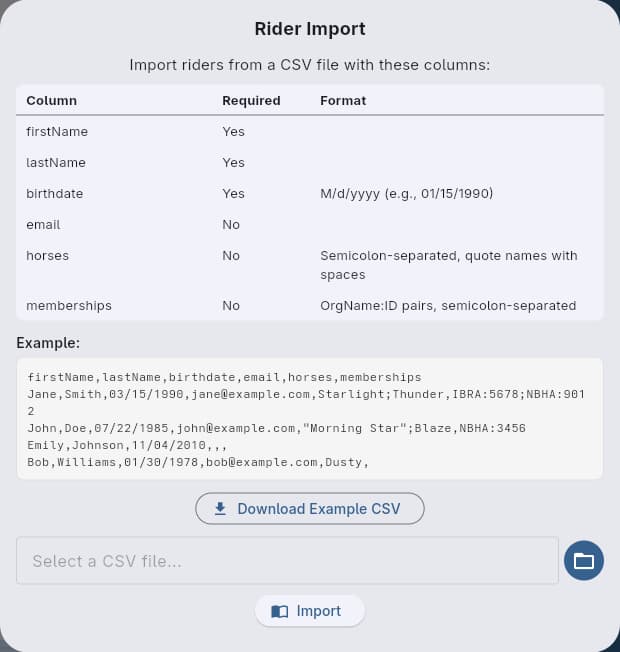
- Review the column reference table in the dialog to verify your file matches the expected format
- Optionally click Download Example CSV to save a sample file you can use as a starting template
- Select your CSV file
- Click Import and review the results
The import dialog includes a structured column reference and a preview of the expected format. If you are unsure about formatting, download the example CSV and use it as a template for your data.
The import attempts to match existing riders by name, birthdate, and email before creating new records. If a match is found, memberships and horses are merged. Otherwise a new rider is created.
Example File
firstName,lastName,birthdate,email,horses,memberships
Jane,Smith,01/15/2010,jane@example.com,Blaze;Thunder,IBRA:12345;NBHA:67890
John,Doe,03/22/2005,john@example.com,Lightning,NBHA:11111
Sarah,Johnson,07/04/1990,sarah@example.com,Star;Comet;Dash,IBRA:22222
See Also
- Rider Database - Managing riders after import
- Memberships - How imported memberships work
Last updated on