Show
A show is a specific dated competition event that belongs to a season. Each show contains one or more individual events (barrel race classes), uses a show template for its venue and fee settings, and assigns event formats to define the rules for each class.
Settings
Name
The show name as it appears to riders and on printed materials. While any name works, using unique names helps riders find the correct show during pre-registration.
Show Date
The date of the competition. Must fall within the parent season’s start and end dates. Select using the date picker or enter in mm/dd/yyyy format.
Show End Date
Optional. For multi-day events, set an end date. Single-day shows can leave this blank.
Per-Day Schedule
Every show has a per-day schedule that controls show-start and expo times on each calendar day. For a single-day show you will see one row in the Schedule card with the show start time and an expo on/off switch with its own start and end times. For a multi-day show the form shows one row per day, labelled “Day N - Mon d”, each with its own show start, expo toggle, and expo times.
The first time you create a show the schedule is seeded from the selected show template. Later, if you extend the date range, new days are appended using the template’s defaults; existing days keep any edits you have made. Shrinking the date range drops the trailing days.
Different days can have completely different schedules - for example, Friday might start at 6:00 PM with no expo, Saturday might start at 9:00 AM with a 7:00-8:30 AM expo, and Sunday might start at 10:00 AM with no expo. Expo fee tiers remain show-wide; only the times and expo on/off flag vary per day.
When you change the show template for an existing show, SpeedySteeds asks whether to reset the per-day schedule to the new template’s defaults. Choose “Keep my edits” to preserve day-by-day customizations, or “Reset” to wipe them and re-seed from the template.
Show Bill
Upload a promotional flyer or document (image or PDF) that is displayed on the show’s online details page when the show is published to the web.
Pre-Registration
Controls whether riders can register online before the show:
- Enable/Disable - Toggle online pre-registration on or off
- Pre-Registration End Date - Defaults to 24 hours before the show. You can adjust this deadline using the date and time pickers.
When pre-registration is active, riders can sign up through the website. Their entries are synced into SpeedySteeds when you fetch registrations.
Show Template
Select an existing show template to apply its venue, fee, and rule settings to this show. Every show must be linked to a template.
Events
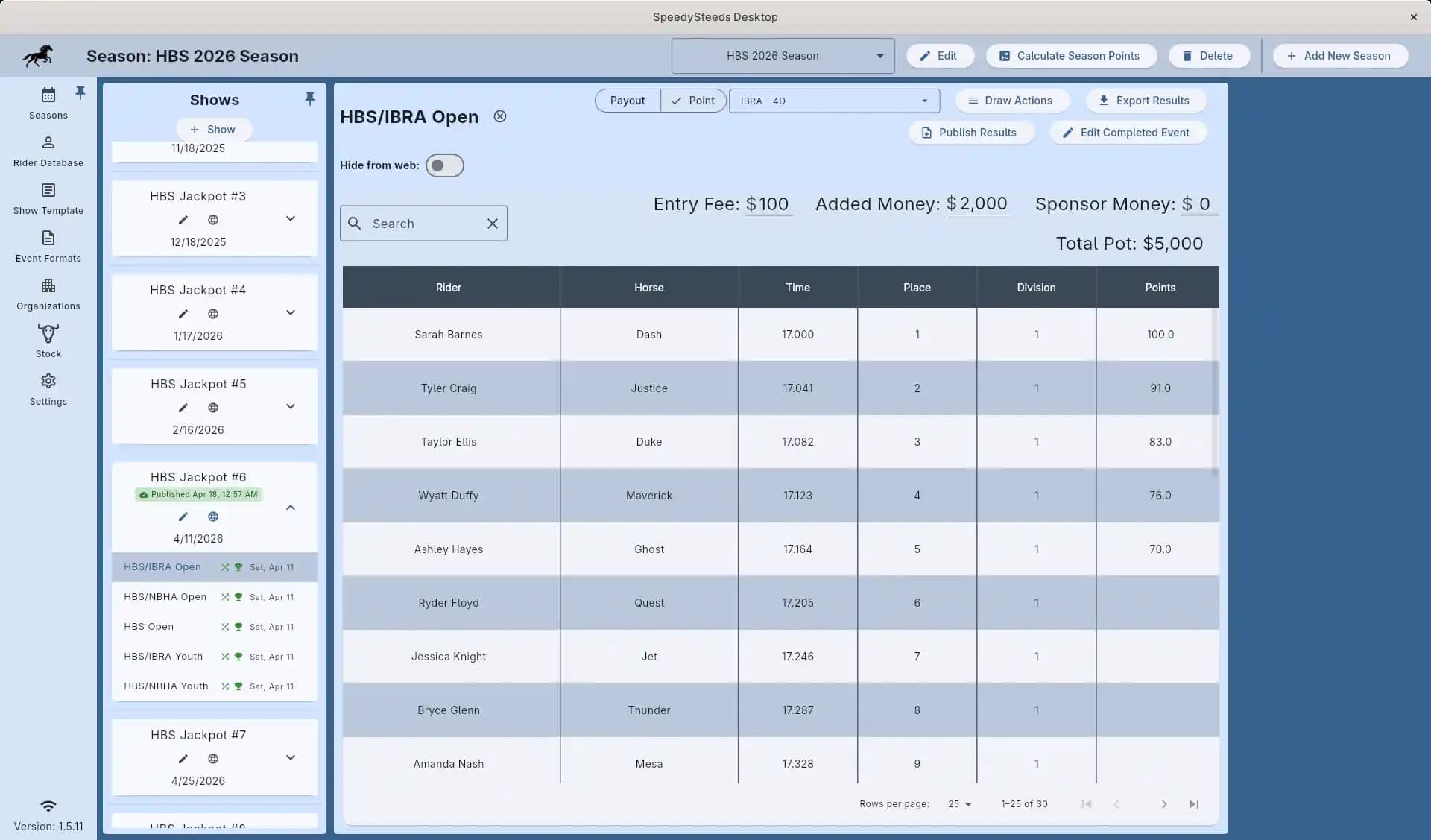
Add one or more events to the show by selecting from your event formats. The same event format can be added multiple times to a single show - useful for multi-day shows where the same class runs on different days, or when the same format is offered more than once in a day. Each event and age group combination requires its own event format assignment. For example, if you run Open Barrels, Youth Barrels, and Senior Barrels, you add three event formats.
Each event can be individually configured with:
- Name - Defaults to the event format name but can be edited on the event details screen. For example, if you add “Open Barrels” twice for a two-day show, you could rename them “Open Barrels - Saturday” and “Open Barrels - Sunday”. The per-event name is what appears on draw sheets, printed results, and the web portal.
- Entry Fee - The per-rider cost to enter this event
- Added Money - Prize money added by the producer on top of entry fee payouts
- Hide from web - When enabled, this event is excluded from everything published to the web. The draw and results are not included in Publish Show, Publish All, Publish Draws, or Publish Results, and AutoSync will not push updates for this event. If the event had already been published (draw or results pushed previously), turning this switch on also removes it from the web immediately. The local event, its entries, and its results are not affected - only the web copy is cleaned up. Useful for jackpots or exhibitions that should stay off the public show page.
Cancellation
A show can be marked as cancelled with an optional cancellation reason. Cancelled shows are excluded from active results and standings calculations.
Cancelling a show does not delete it - results and data are preserved. You can un-cancel a show if needed.
Show Card Actions
Each show card on the Seasons screen exposes three icon buttons in its trailing row:
- Edit (pencil) - mutating actions on the show itself: Edit Show, Manage Performances, Manage Sanctions, Manage Buddy Groups, Add Sidepot, Cancel Show, Delete Show, Restore Show.
- Reports (summary) - read-only outputs and printable documents: Daily High Point, Export Fee Summary, Print Medication Form, Copy Show Link, Print QR Code. Items appear only when relevant (for example, Print Medication Form is hidden when no medication protocol is set, and web-link items are hidden when the license is expired).
- Web (globe) - publishing and web sync: Publish All, Publish Show, Publish Draws, Publish Results, Get Online Registrations. The globe button is hidden when the license is expired.
Splitting read-only reports out of the Edit and Web menus keeps the secretary’s flow predictable: the pencil only changes show data, Reports only produces files or links, and the globe only pushes or pulls over the network.
Workflow
- Navigate to the Seasons tab and select a season
- Click the add button to create a new show
- Enter the show name and date
- Select a show template
- Add event formats for each class you want to run
- Configure entry fees and added money per event
- Optionally enable pre-registration and upload a show bill
- On show day, proceed to rider registration and draw management
See Also
- Season - The parent container for shows
- Show Template - Venue and fee settings
- Event Format - Rules for individual events
- Rider Registration - Adding riders on show day
- Performance Scheduling - Organizing rodeo performances and slack
- Show Fees & Billing - Tracking payments